
Product Description
The Rexroth Indramat DDS02.2-W100-BE45-01-FW is a modular digital AC servo drive controller from the DDS02.2 series, designed for industrial machine-tool and automated motion-control systems. It uses internal control-cabinet air cooling, supports digital servo and resolver motor feedback, and is configured for a SERCOS command interface. The W100 designation identifies the 100 A rated-current class, while the BE45-01 configuration identifies a specific control and function arrangement that must be matched to the machine’s existing drive configuration. The DDS platform uses a modular architecture with a basic drive unit, plug-in modules, and application-specific firmware. This listing is described as New Original Packaging; buyers should verify the serial number, nameplate, firmware documentation, and included accessories before installation.
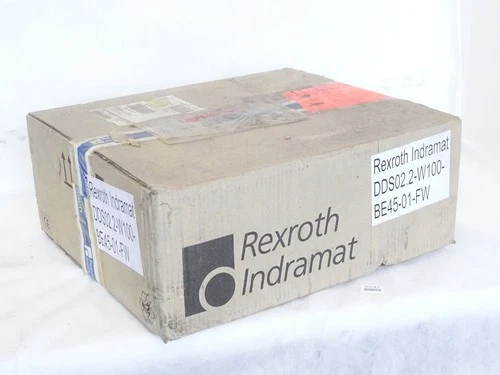
Key Product Parameters
- Brand: Rexroth Indramat
- Model: DDS02.2-W100-BE45-01-FW
- Product Series: DDS02.2 Digital Drive Controllers
- Product Type: AC Servo Drive Controller
- Rated Current Class: 100 A
- DC Bus Voltage: 300 V DC nominal, with specified tolerance to be confirmed against the applicable manual and system power supply
- Cooling Method: Internal control-cabinet air cooling
- Motor Feedback: Digital servo feedback and resolver feedback
- Command Interface: SERCOS
- Function ID: 45-01 configuration
- Firmware: Required; confirm the correct firmware version and whether it is included with the supplied unit
- Protection: Cabinet installation; verify the exact enclosure protection rating in the applicable technical documentation
- Product Status: New Original Packaging, as stated in the seller’s listing
- Dimensions: Verify from the unit and installation documentation
- Weight: Verify from the exact hardware configuration
- Country of Origin: Check the product nameplate
- Discontinued: Legacy product; confirm current manufacturer support and spare-parts availability
Operating Procedures and Usage Instructions
- Installation Preparation
- Confirm that the complete type code reads DDS02.2-W100-BE45-01-FW.
- Compare the drive’s nameplate, material number, hardware configuration, and firmware identification with the machine’s original documentation.
- Verify compatibility with the installed Indramat power supply, motor, feedback device, SERCOS interface, and other DDS modules.
- Check cabinet ventilation, mounting clearances, grounding points, and cable routing before installation.
- Inspect the packaging and unit for transport damage. Confirm that all required plug-in modules and connectors are present.
- Electrical Installation
- Isolate and lock out the machine’s power supply before wiring.
- Allow the DC bus to discharge and verify the absence of hazardous voltage using an appropriate meter.
- Mount the controller in the designated control cabinet position and secure it according to the manufacturer’s instructions.
- Connect the DC bus and protective earth using the specified terminals, conductor sizes, and tightening torques.
- Connect motor power cables and feedback cables to the correct terminals. Keep feedback wiring separated from high-current power cables.
- Connect the SERCOS communication interface using the correct optical components and fiber-optic routing.
- Verify auxiliary control-power connections against the system wiring diagram. Do not assume that the auxiliary supply and DC bus use the same input.
- Startup and Commissioning
- Check the power supply, grounding, motor wiring, feedback connections, and cooling airflow before energizing the system.
- Confirm that the controller is installed in the correct DDS rack or cabinet arrangement.
- Verify the SERCOS communication path, drive addressing, and communication status with the machine controller.
- Load or confirm the firmware and drive configuration approved for the machine.
- Check motor type, feedback selection, current limits, travel limits, and control parameters before enabling motion.
- Perform initial testing at reduced speed and load. Monitor status indicators and controller diagnostics throughout commissioning.
- Normal Operation
- Monitor drive status, motor response, feedback signals, and SERCOS communication during machine operation.
- Check for abnormal noise, excessive temperature, unexpected motor movement, or recurring diagnostic messages.
- Keep cabinet ventilation paths clear and ensure that cooling air can circulate around the drive.
- Record operating parameters and fault histories to support maintenance and troubleshooting.
- Parameter Configuration
- Use the configuration and diagnostic procedures applicable to the installed Indramat DDS system.
- Confirm that the firmware version matches the machine’s approved configuration.
- Do not copy parameters from another DDS02.2 controller solely because its current rating or housing appears similar.
- Back up the original drive parameters before making changes.
- Shutdown
- Stop the machine using the approved controller sequence.
- Disable drive enable signals and isolate the power supply according to site procedures.
- Wait for the DC bus to discharge, then verify the safe voltage condition before disconnecting cables or removing the controller.
- Label all wiring and record the original module positions before replacement.
Daily Maintenance
- Check the drive’s status indicators and machine diagnostics for abnormal conditions.
- Inspect cabinet filters, fans, and air passages for dust accumulation or restricted airflow.
- Check cable insulation, connectors, grounding, and terminal security during scheduled inspections.
- Monitor cabinet temperature and investigate repeated overheating alarms.
- Keep the controller dry and free from conductive dust, oil mist, and corrosive contamination.
- Back up drive parameters and retain firmware identification, wiring diagrams, and commissioning records.
- Follow the manufacturer’s maintenance intervals for the complete drive system.
Troubleshooting
- Drive does not power up: Check the incoming power supply, DC bus, auxiliary control supply, protective devices, and cabinet wiring.
- Drive reports a feedback fault: Verify the motor feedback type, encoder or resolver cable, connector pinout, shielding, and feedback configuration.
- SERCOS communication fault: Inspect fiber-optic connections, communication modules, network topology, and controller configuration.
- Motor does not respond to commands: Check drive enable conditions, controller interlocks, command communication, motor wiring, and parameter settings.
- Overtemperature warning: Inspect cabinet airflow, cooling fans, filters, ambient temperature, and drive loading.
- Unexpected motor behavior: Stop the machine and verify motor identification, feedback polarity, parameter sets, and the installed firmware.
- Repeated drive faults: Record the complete diagnostic code and operating conditions before resetting or replacing components.
Safety Precautions
- Installation, commissioning, and repair must be performed by qualified industrial electrical and automation personnel.
- Always isolate the power supply and follow lockout/tagout procedures before working on the drive.
- The DC bus can retain hazardous voltage after power is disconnected. Verify discharge before handling electrical connections.
- Never connect or disconnect motor, feedback, or communication cables while the system is energized.
- Use the specified protective-earth connection and cable shielding arrangement.
- Do not exceed the drive’s rated current, voltage, temperature, or installation limits.
- Confirm motor, feedback, firmware, and communication compatibility before enabling the machine.
- Do not treat another DDS02.2 model with a similar current rating as an automatic replacement.
Product Keywords
Rexroth Indramat DDS02.2-W100-BE45-01-FW, DDS02.2 servo drive, Bosch Rexroth AC servo controller, 100 A servo drive, Indramat digital drive controller, SERCOS servo drive, industrial motion control, modular servo amplifier, machine tool drive controller, Indramat DDS spare parts, CNC drive system, industrial automation components.
For industrial automation parts and related control-system components, visit https://www.newplcdcs.com.
15 Related Models / Product References
The following are DDS-series product references for identification and sourcing research. They are not confirmed direct replacements for DDS02.2-W100-BE45-01-FW. Verify the complete type code, material number, firmware, feedback configuration, command interface, and machine application before ordering.
- DDS02.2-W100-BE43-01-FW
- DDS02.2-W100-BE43-02-FW
- DDS02.2-W100-BE46-01-FW
- DDS02.2-W100-BE48-01-FW
- DDS02.2-W100-BE49-02-FW
- DDS02.2-W100-BE52-01-FW
- DDS02.2-W100-BE56-01-FW
- DDS02.2-W100-BE68-01-FW
- DDS02.2-W100-BE34-01-FW
- DDS02.2-W100-BE37-01-FW
- DDS02.2-W100-BA01-01-FW
- DDS02.2-W100-BA03-01-FW
- DDS02.2-W100-BA06-01-FW
- DDS02.2-W100-BA07-01-FW
- DDS02.2-W100-BA10-01-FW
For replacement selection, compare the complete configuration code and the machine’s original drive documentation rather than relying on the DDS02.2 series designation alone.


