
Product Introduction
The B&R 5D5200.29 Operator Panel is an industrial human-machine interface (HMI) designed to provide operators with a touchscreen interface for monitoring machine conditions, viewing process information, and interacting with automation equipment. Identified in industrial spare-parts catalogs as a Power Panel 10 with a 10.5-inch touchscreen and Ethernet connectivity, this panel is intended for machine-level visualization and operator control. It can serve as a replacement component in existing installations where the original hardware configuration, communication architecture, and HMI application are supported. Before installation, verify the complete part number, hardware revision, connection layout, and software compatibility against the original equipment documentation.
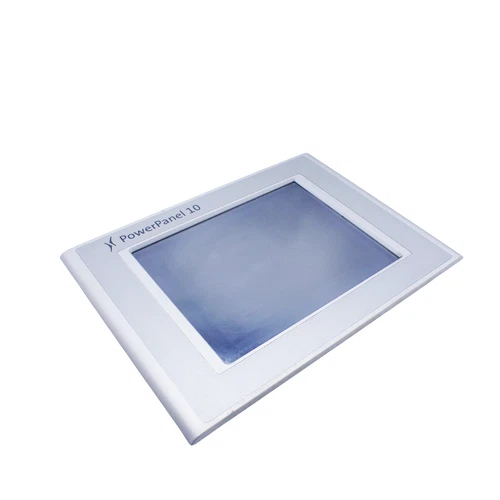
Technical Specifications
- Brand: B&R Automation
- Model: 5D5200.29
- Product Series: Power Panel / 5D5 operator interface family (catalog classification should be confirmed)
- Product Name: Power Panel 10 Operator Interface
- Product Type: Industrial HMI / Touchscreen Operator Panel
- Display Size: 10.5 inches (approximately)
- Display Type: Industrial color display; exact panel technology requires revision verification
- Touchscreen: Touch-operated interface
- Communication Interface: Ethernet connector
- Primary Application: Machine visualization and operator interaction
- System Integration: Verify supported controller and host architecture
- Software Compatibility: Confirm against the installed B&R HMI environment and original project
- Mounting: Panel-mounted installation; exact cutout dimensions require the mechanical drawing
- Front Protection Rating: Not reliably published for this exact model
- Rear Protection Rating: Not reliably published for this exact model
- Power Requirements: Verify the rated input voltage and current on the nameplate
- Dimensions: Not reliably published for this exact model
- Weight: Approximately 2.55 kg (5.62 lb), according to distributor data
- Place of Manufacture: Not reliably published
- Country of Origin: Verify product label and shipping documentation
- Product Status: Discontinued by manufacturer according to distributor listings
- Condition: New surplus, used, or refurbished depending on the supplied unit
- Installation Environment: Industrial control cabinet or machine operator station, subject to environmental specifications
Key Technical Features
- Touchscreen Operator Interface: Provides direct operator interaction with machine visualization screens and configured control functions.
- 10.5-Inch Display: Offers a dedicated display area for process information, machine status, alarms, and operator commands.
- Ethernet Connectivity: Supports network-based communication where the connected controller and application are configured for the panel’s supported interface.
- Industrial Automation Integration: Intended for machine-level HMI applications rather than standalone process control.
- Operator Monitoring: Can display configured operating values, equipment status, alarm messages, and production information.
- Maintenance Support: Provides an operator access point for maintenance screens, diagnostic information, and service functions when programmed into the application.
- Legacy Equipment Support: Useful when maintaining older B&R automation installations where the original HMI hardware and project configuration must be preserved.
- Replacement and Repair Applications: Can be considered for equipment restoration, panel replacement, or spare-parts inventory after exact revision verification.
Typical Application Scenarios
- Industrial machinery operator stations
- Automated production and assembly lines
- Packaging and material-handling equipment
- Machine process monitoring
- Production status and alarm visualization
- Existing B&R automation installations
- Legacy equipment maintenance and restoration
- Industrial control cabinet HMI replacement projects
Operating Procedures
1. Installation
- Confirm that the panel part number is 5D5200.29 and record its hardware revision and serial number.
- Compare the replacement panel with the original unit, including connectors, mounting points, and cable arrangement.
- Check the panel cutout and mounting clearance against the original mechanical drawing.
- Inspect the Ethernet connector and all other connection points for damage.
- Disconnect power before installing or removing the panel.
- Secure the unit using the specified mounting hardware and tightening procedure.
- Connect the required power, communication, and peripheral cables according to the approved wiring documentation.
- Confirm that protective grounding and cabinet bonding meet the machine manufacturer’s requirements.
2. Startup and Power-On
- Verify the input supply against the panel nameplate before energizing.
- Inspect the wiring and confirm that no connectors are loose.
- Power on the associated controller and operator panel according to the machine startup sequence.
- Observe the display for startup messages, diagnostic indicators, or unexpected error conditions.
- Confirm that the HMI application starts correctly.
- Check Ethernet link status and verify communication with the intended controller.
- Do not place the machine into automatic operation until the HMI and controller communication have been confirmed.
3. Normal Operation
- Use the touchscreen to navigate the configured machine screens.
- Monitor operating values, alarms, equipment status, and production information.
- Confirm that displayed values correspond to the actual controller data.
- Use authorized operator commands only.
- Acknowledge alarms according to the plant operating procedure.
- Report abnormal screen behavior, communication interruptions, or inconsistent process values to maintenance personnel.
4. Parameter Configuration and Modification
- Back up the existing HMI project before making any modifications.
- Confirm the applicable B&R development environment and software version.
- Verify the controller address, Ethernet settings, communication parameters, and application configuration.
- Modify screen layouts, alarm definitions, or displayed variables only when authorized.
- Confirm that the HMI tags correspond to the correct controller variables.
- Download the revised application using the documented engineering procedure.
- Test all modified screens and operator commands before returning the equipment to production.
5. Shutdown
- Stop the machine using its approved shutdown sequence.
- Save or record relevant production and diagnostic information.
- Close or exit the HMI application if required by the machine procedure.
- Isolate the panel power supply before maintenance or disconnection.
- Do not disconnect Ethernet or other communication cables while they are required for an active control process.
Daily Maintenance
- Clean the touchscreen using a soft, lint-free cloth.
- Avoid abrasive cleaners, solvents, and excessive moisture.
- Inspect the display for cracks, scratches, discoloration, or dead areas.
- Check the mounting hardware for looseness.
- Inspect Ethernet and power connections for mechanical damage.
- Keep the cabinet free from excessive dust, oil, and moisture.
- Verify that the HMI communicates normally with the controller.
- Record recurring alarms, screen freezes, or communication interruptions.
- Maintain a current backup of the HMI project and related configuration files.
Troubleshooting Guide
Problem: Panel does not power on
- Check the input supply and protective device.
- Verify the wiring polarity and connector seating.
- Inspect the power cable and terminal condition.
- Confirm that the supply voltage matches the nameplate.
Problem: Display remains blank
- Check whether the panel receives power.
- Inspect the display startup sequence.
- Check the controller or host connection.
- Investigate possible hardware or backlight faults.
Problem: Touchscreen does not respond
- Clean the screen and remove any surface contamination.
- Check for physical damage.
- Verify touchscreen configuration and calibration where supported.
- Check the application and panel hardware for faults.
Problem: Ethernet communication failure
- Inspect the Ethernet cable and connector.
- Verify network link status.
- Check IP address settings and subnet configuration.
- Confirm the controller communication configuration.
- Check for duplicate IP addresses or network infrastructure faults.
Problem: HMI application fails to start
- Check the installed application and system configuration.
- Verify compatibility between the panel, host system, and project version.
- Review available diagnostic messages.
- Restore a verified project backup if the application has been corrupted.
Problem: Incorrect process values are displayed
- Verify HMI variable assignments.
- Check controller communication status.
- Confirm data types, scaling, and engineering units.
- Compare the displayed values with controller diagnostics and field measurements.
Frequently Asked Questions
Q1: What is the B&R 5D5200.29?
It is an industrial operator interface panel identified by distributor catalogs as a Power Panel 10 with a 10.5-inch touchscreen and Ethernet connectivity.
Q2: Is the 5D5200.29 discontinued?
Yes. Industrial spare-parts distributor listings identify this model as discontinued by the manufacturer. Availability is generally through existing inventory, surplus stock, or refurbished equipment.
Q3: Can it directly replace another B&R operator panel?
Not automatically. Display size, electrical connections, communication interfaces, mounting dimensions, host compatibility, and HMI software must all be checked before substitution.
Q4: Does the panel support Ethernet communication?
Distributor specifications identify an Ethernet connector. The supported communication protocol and network configuration must be confirmed from the applicable system documentation.
Q5: Can the panel be used with a different B&R controller?
Compatibility depends on the controller architecture, host interface, software environment, and application configuration. Confirm the complete system combination before installation.
Q6: Does the 5D5200.29 include an HMI project?
The project is normally specific to the machine or application. The presence of a working project or retained configuration should be confirmed with the seller.
Q7: What should be checked before purchasing a replacement?
Check the complete part number, revision, serial number, physical condition, display operation, touchscreen response, Ethernet connector, and any available test records.
Q8: Is the 5D5200.29 suitable for a new machine design?
Because it is reported as discontinued, it is generally more appropriate for maintaining existing equipment than for a new long-term design.
Safety Precautions
- ⚠️ Disconnect the power supply before installation, removal, or wiring work.
- ⚠️ Verify the rated supply voltage using the product nameplate.
- ⚠️ Do not open the panel or modify internal circuitry unless authorized and qualified.
- ⚠️ Use approved grounding and electrostatic-discharge protection procedures.
- ⚠️ Do not install the panel in an environment outside its verified temperature, humidity, or protection ratings.
- ⚠️ Confirm all control commands and safety-related machine interlocks independently of the HMI.
- ⚠️ Never treat the operator panel as a safety controller or emergency-stop device.
- ⚠️ Test the complete machine sequence after replacement before returning the equipment to service.
Related B&R Models and Components
The following are related B&R operator-interface models and associated platform components. They are useful references when identifying legacy equipment, sourcing spares, or investigating a replacement. They are not confirmed drop-in replacements for the 5D5200.29.
- 5D5200.01 – Operator Interface Panel
- 5D5200.04 – Operator Interface Panel
- 5D5200.12 – Operator Interface Panel
- 5D5200.18 – Operator Interface Panel
- 5D5200.21 – Operator Interface Panel
- 5D5200.27 – Operator Interface Panel
- 5D5200.30 – Operator Interface Panel
- 5D5200.32 – Operator Interface Panel
- 5D5200.33 – Operator Interface Panel
- 5D5200.35 – Operator Interface Panel
- 5D5201.02 – Provit 5000 Display Unit
- 5D5210.01 – Provit 5000 10.4-Inch Operator Panel
- 5D5210.02 – Provit 5000 Operator Interface
- 5D5211.03 – Provit 5000 12.1-Inch Touchscreen Panel
- 5D5212.02 – Operator Interface Panel
Replacement Note: These models belong to related B&R operator-interface product families or panel configurations. Confirm display specifications, interface type, cable arrangement, controller compatibility, software support, and mechanical dimensions before selecting an alternative.


