
Product Description
The B&R 5PC910.SX02-00 is a two-slot system unit from the Automation PC 910 series, designed for industrial automation, machine control, process visualization, and data acquisition applications. The system provides expansion capacity for PCI and PCI Express bus units, additional interface options, slide-in storage devices, and monitor or panel connections. The advertised configuration identifies an Intel Core i7 processor and SSD storage, making it suitable for industrial applications that require PC-based control and visualization. The exact CPU board, memory capacity, SSD capacity, operating system, and installed software should be verified against the unit’s hardware labels and configuration before integration.
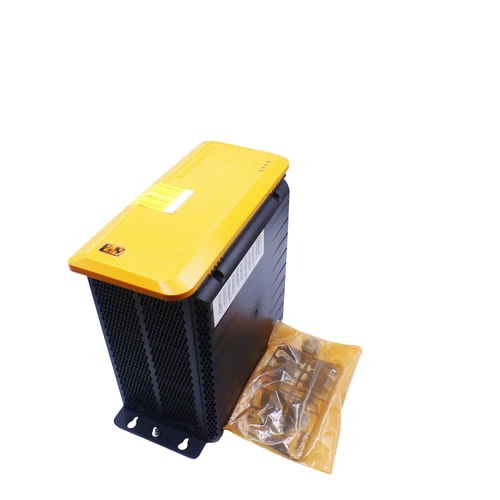
Product Datasheet
- Brand: B&R Industrial Automation
- Product Series: Automation PC 910 (APC910)
- System Unit Model: 5PC910.SX02-00
- Additional Listed Part Number: 5Y2SC0300000V0-000
- Product Type: Two-slot industrial automation PC
- Processor: Intel Core i7, exact CPU board revision to be verified
- Compatible CPU Board: 5PC900.TS17-04, Intel Core i7-6820EQ, quad-core, 2.8 GHz
- Memory: SO-DIMM DDR3 or DDR4, depending on installed CPU board and configuration
- Storage: SSD, exact capacity and installed drive model to be verified
- Expansion: Two-slot bus unit; supported configurations include PCI and PCI Express
- Ethernet: Two shielded RJ45 ports, 10/100/1000 Mbit/s
- Serial Interface: RS232, 9-pin male DSUB
- USB Interfaces: Four USB 3.0 ports and one USB 2.0 port
- Display Interfaces: DisplayPort and DVI-I/SDL monitor interface options
- CFast: One CFast slot
- Power Supply: 24 VDC ±25%
- Maximum Input Current: 5.5 A
- Ingress Protection: IP20
- Storage Temperature: -20 to +60°C
- Operating Temperature: Depends on installed components and configuration
- Condition: New – Open Box, as stated in the listing
- Country of Origin: Not verified
Operating Guidelines and Usage
- Verify the system-unit model and installed CPU board before connecting the computer to the machine.
- Confirm the installed memory, SSD, bus unit, and interface options against the machine’s hardware configuration.
- Mount the APC910 in a suitable industrial enclosure with adequate ventilation and clearance for maintenance.
- Connect the 24 VDC supply using the specified three-pin power connector.
- Connect protective earth and verify the grounding arrangement before energizing the unit.
- Connect Ethernet, serial, USB, and display devices according to the control-system wiring documentation.
- Confirm that the installed operating system, B&R Automation Runtime, and Automation Studio hardware configuration are compatible.
- Verify communication with PLCs, drives, remote I/O, and other connected equipment before placing the system into production.
Power-On and Power-Off Sequence
Power-On
- Inspect the enclosure, power connector, cables, and ventilation openings.
- Verify that the supply voltage is within the specified 24 VDC ±25% range.
- Confirm that peripheral devices and expansion cards are correctly installed.
- Apply the 24 VDC supply.
- Allow the system to complete its BIOS and operating-system startup sequence.
- Check system status, storage recognition, network connectivity, and application startup.
- Confirm communication with connected automation equipment before enabling machine operation.
Power-Off
- Stop active machine processes using the approved shutdown procedure.
- Close running applications and save required data.
- Shut down the operating system normally.
- Wait until the computer has completed its shutdown sequence.
- Disconnect the 24 VDC supply only after the system is safely stopped.
- Apply lockout/tagout procedures before removing hardware or changing wiring.
Normal Operating Procedure
- Monitor CPU load, memory usage, storage status, and system temperature during operation.
- Check Ethernet connections and communication status with automation devices.
- Keep the enclosure and computer ventilation paths free of dust and obstructions.
- Confirm that the SSD has sufficient available capacity for operating-system and application requirements.
- Maintain backups of operating-system images, application files, machine configurations, and licenses.
- Record system alarms, unexpected restarts, and communication interruptions for maintenance analysis.
- Avoid connecting unapproved USB devices or installing unverified software on production systems.
Parameter Settings and Modification
The APC910 is a configurable industrial PC rather than a standalone PLC module. Its hardware and software configuration depends on the installed CPU board, memory, storage, expansion bus, interface cards, BIOS, and operating environment.
Before making changes:
- Confirm the exact CPU board model and hardware revision.
- Check the installed RAM type and capacity before upgrading memory.
- Verify SSD interface, physical format, and compatibility before replacing the storage device.
- Confirm PCI or PCI Express card compatibility with the installed bus unit.
- Use the appropriate B&R Automation Studio hardware upgrade package for the system unit and CPU board.
- Verify BIOS and firmware compatibility before performing updates.
- Back up the operating system, application software, licenses, and configuration data before changing system settings.
Maintenance and Troubleshooting
Preventive Maintenance
- Inspect the power connector and grounding connections periodically.
- Clean ventilation openings and cooling components during scheduled maintenance.
- Check fan operation and listen for abnormal noise.
- Review system logs for temperature warnings, storage errors, and unexpected shutdowns.
- Check SSD health and maintain a current backup of critical data.
- Inspect expansion cards and interface connections for looseness or corrosion.
- Verify that the enclosure temperature remains within the limits of the installed components.
Troubleshooting
- Computer does not start: Check the 24 VDC supply, connector polarity, grounding, and power status.
- No operating-system startup: Check BIOS boot settings, SSD recognition, and operating-system integrity.
- SSD not detected: Inspect the drive connection and verify storage-device compatibility.
- Network communication failure: Check Ethernet cables, port status, IP configuration, and communication settings.
- USB device not recognized: Check the device, cable, port, and operating-system driver.
- Unexpected shutdown or restart: Review supply stability, cooling, system logs, and hardware diagnostics.
- Expansion card not detected: Confirm bus-unit configuration, card compatibility, and the required hardware upgrade.
Hardware replacement and firmware maintenance should be performed by qualified personnel familiar with B&R Automation PC systems.
Safety Precautions
- Use only a regulated 24 VDC supply within the manufacturer’s specified tolerance.
- Verify power polarity and protective earth before energizing the computer.
- Disconnect the power supply before installing or removing memory, storage, interface cards, or other internal components.
- Observe electrostatic discharge precautions when handling electronic assemblies.
- Do not obstruct ventilation openings or operate the system outside the permitted environmental conditions.
- Use compatible expansion cards and accessories approved for the APC910 platform.
- Maintain backups before changing BIOS settings, firmware, operating-system images, or application software.
- Follow B&R documentation and the machine manufacturer’s electrical and operational safety procedures.
Recommended Related B&R Models and Components
The following items belong to the APC910 platform or its associated component range. They are related components and configurations, not guaranteed direct replacements for the complete 5PC910.SX02-00 assembly.
- 5PC910.SX01-00 – APC910 one-slot system unit
- 5PC910.SX03-00 – APC910 three-slot system unit
- 5PC910.SX05-00 – APC910 five-slot system unit
- 5PC900.TS17-04 – Intel Core i7-6820EQ CPU board
- 5PC900.TS17-03 – Intel Xeon E3-1515MV5 CPU board
- 5PC900.TS17-02 – Intel Celeron G3900E CPU board
- 5PC900.TS17-01 – Intel Core i3-6100E CPU board
- 5PC900.TS17-00 – Intel Core i5-6440EQ CPU board
- 5AC901.BX02-00 – APC910 two-slot bus unit with two PCI slots
- 5AC901.BX02-01 – APC910 two-slot bus unit with one PCI and one PCIe slot
- 5AC901.BX02-02 – APC910 two-slot bus unit with two PCIe slots
- 5AC901.CSSD-04 – 128 GB SATA SSD
- 5AC901.CSSD-05 – 256 GB SATA SSD
- 5AC901.CSSD-06 – 512 GB SATA SSD
- 5AC901.FA02-00 – APC910 fan kit for the two-slot system unit


